Version:1.0 StartHTML:000000261 EndHTML:000014195 StartFragment:000002777 EndFragment:000014163 StartSelection:000002777 EndSelection:000014163 SourceURL:http://stoppauseplayfastforwardrewindejectrecord.us/blog1/wp-admin/post.php?post=15079&action=edithttp://stoppauseplayfastforwardrewindejectrecord.us/blog1/wp-includes/js/tinymce/plugins/wpembed/../../../wp-embed.js
8/16/2017
did the following then use “regenerate thumbnails” to fix media library thumbnails showing up as gray generic document icons:
Version:1.0 StartHTML:000000280 EndHTML:000010093 StartFragment:000004382 EndFragment:000010039 StartSelection:000004382 EndSelection:000010007 SourceURL:https://www.a2hosting.com/kb/cpanel/cpanel-database-features/optimizing-and-repairing-mysql-databases-with-phpmyadminOptimizing and repairing MySQL databases with phpMyAdminhttps://www.google-analytics.com/plugins/ua/linkid.js//bat.bing.com/bat.js//www.google-analytics.com/analytics.jshttps://ajax.googleapis.com/ajax/libs/jquery/1.11.2/jquery.min.js// <![CDATA[
window.jQuery || document.write('’)
// ]]>/js/bootstrap.min.js/js/jquery.main.js/js/URI.js/js/layout_main.js
https://oss.maxcdn.com/libs/html5shiv/3.7.0/html5shiv.js
https://oss.maxcdn.com/libs/respond.js/1.4.2/respond.min.js
/js/locale.js// -1) {
domains.splice(index, 1);
}
console.log(‘Domains after removing ‘+window.location.hostname+’ : ‘+JSON.stringify(domains));
ga(‘create’, ‘UA-344424-1’, ‘auto’, {‘allowLinker’: true});
ga(‘require’, ‘displayfeatures’);
ga(‘require’, ‘linkid’, ‘linkid.js’);
ga(‘require’, ‘linker’);
ga(‘linker:autoLink’, domains );
ga(‘send’, ‘pageview’);
});
// ]]>
Knowledge Base
How to optimize and repair MySQL databases using phpMyAdmin
This article describes how to optimize and repair MySQL databases using phpMyAdmin.
Table of Contents
Optimizing MySQL databases
Databases have the potential to grow very large, particularly on sites that receive a lot of traffic or have a large amount of content. In such cases, periodic database optimization may help improve web site performance.
To optimize a MySQL database, follow these steps:
- Log in to cPanel.
If you do not know how to log in to your cPanel account, please see this article.
- In the Databases section of the cPanel home screen, click phpMyAdmin. The phpMyAdmin administration page appears in a new window.
- In the left pane, click the name of the database that you want to optimize. For example, the following image shows the example_wordpress database selected:
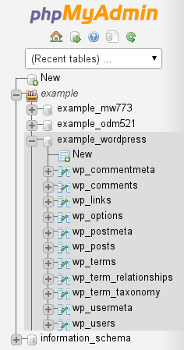
- In the right pane, select the check boxes for the tables in the database that you want to optimize.
To select all of the tables at once, select the Check All check box.
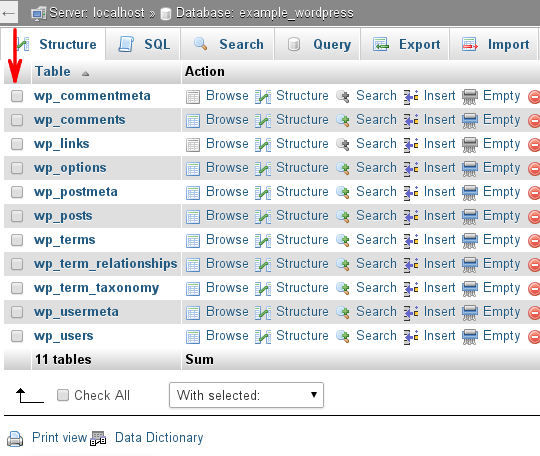
- In the With selected list box, select Optimize table. phpMyAdmin informs you whether or not the optimization process is successful.
Repairing MySQL databases
Databases can become corrupted for any number of reasons, from software defects to hardware issues. If this occurs, you can try to repair database tables using phpMyAdmin.
To repair MySQL database tables, follow these steps:
- Log in to cPanel.
If you do not know how to log in to your cPanel account, please see this article.
- In the Databases section of the cPanel home screen, click phpMyAdmin. The phpMyAdmin administration page appears in a new window.
- In the left pane, click the name of the database that you want to work on. For example, the following image shows the example_wordpress database selected:
- In the right pane, select the check boxes for the tables in the database that you want to repair.
To select all of the tables at once, select the Check All check box.
- In the With selected list box, select Repair table. phpMyAdmin informs you whether or not the repair process is successful.
More Information
For more information about phpMyAdmin, please visit http://www.phpmyadmin.net.
 stoppauseplayfastforwardrewindejectrecorddotnet